SVOX UK English Oliver Voice
When combined with TTS-enabled apps, Oliver can:- give directions, allowing you to keep your eyes on the road while you're driving - read a notification containing the caller / sender's name, and read the content of an incoming call / sms / mms / email- read aloud your favorite e-books or pdf documents- help you learn English by reading aloud the correct pronunciation
and much more… the possibilities are limitless!Browse http://svoxmobilevoices.wordpress.com for a list of compatible apps and voice demos.
NEW!
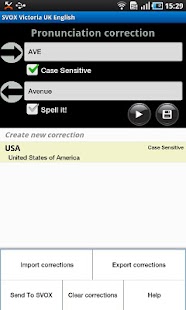
Pronunciation correction feature: correct the default output according to your preferences!
== INSTRUCTIONS ==1.
Install and run the voice app once 2.
Install free SVOX Classic Text-to-Speech Engine 3.
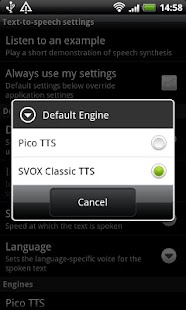
Go to Android Settings -> Voice Input & Output -> Text-to-Speech settings.Activate SvoxClassic at the bottom of the screen.Select SvoxClassic as the Default Engine.4.
Run the voice app, click “Continue”, then follow the instructions.
5.
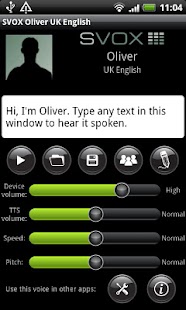
Your SVOX Voice main screen will be now visible.
Don’t forget to try the new pronunciations correction feature (‘pencil’ icon)!6.
Download other free / paid apps to combine our voice with.
For example, you could try: Google Navigation (on Android 2.2 and later, only with Navigation < 5.9), Moon+ Reader PRO, Voice Actions Plus, TalkToMe Classic, Book Speech Audio Books, Transzilla, Good Morning, WakeVoice...Browse http://svoxmobilevoices.wordpress.com/faq/ for a list of frequently asked questions.And now … enjoy your new SVOX voice!
== PRONUNCIATION CORRECTION FEATURE - HOW TO ==1.
Run the voice app2.
Click on the ‘pencil’ icon.
The pronunciation correction screen will now be shown.3.
Tap on the Android menu key and select ‘Help’
== NOTES == 1.
Google Navigation requires that the Text-to-Speech voice matches the phone language.
You can change the phone language in Android Settings -> Language & keyboard -> Select language Compatible with Google Navigation version < 5.92.
On Android 2.1 and earlier, only some apps, like Google Translation, support changing voices.
About SVOX UK English Oliver Voice
- Package name (App ID)
- com.svox.classic.langpack.eng_gbr_male
- Available on
- Google Play
- Price
- Free
- Version
- v3.1.4
Looking for the SVOX UK English Oliver Voice APK?
The safest way to get SVOX UK English Oliver Voice (com.svox.classic.langpack.eng_gbr_male) on your Android device is to install it directly from Google Play — you'll always get the latest official version, automatic updates, and no risk of modified or infected APK files from third-party sites.
Music Features
Enjoy high-quality music streaming and playback features.
Learning Tools
Enhance your learning experience with interactive features.
Food & Dining
Discover recipes and order food from your favorite restaurants.
See SVOX UK English Oliver Voice in Action
Frequently Asked Questions
Is SVOX UK English Oliver Voice free?
Yes, SVOX UK English Oliver Voice is free to download and install on Android through Google Play.
How do I install SVOX UK English Oliver Voice on Android?
Open Google Play on your Android phone or tablet, search for SVOX UK English Oliver Voice or tap the Google Play button on this page, then tap Install. The app downloads and installs automatically.
What is com.svox.classic.langpack.eng_gbr_male?
com.svox.classic.langpack.eng_gbr_male is the App ID (package name) of SVOX UK English Oliver Voice on Google Play. Every Android app has a unique package name, and it is the safest way to verify you are installing the official app.
Is SVOX UK English Oliver Voice safe to download?
Installing SVOX UK English Oliver Voice from Google Play is the safest option: you get the official version, verified by Google Play Protect, with automatic updates. Avoid APK files from unofficial third-party sites.

Get SVOX UK English Oliver Voice Today
SVOX UK English Oliver Voice for Android — free download on Google Play.
Compatible with Android phones and tablets — available on Google Play.
Ask AI about this app
Get instant answers about features, tips and more from popular AI assistants.